

What’s in this doc
This guide provides a high-level summary of the benefits of integrating Shinami’s Wallet Services into your application. To help you choose the right wallet for your needs, we summarize the similarities and key differences between our app-controlled Invisible Wallets and user-controlled zkLogin wallets. We also show you an image of a transaction flow for each kind of wallet so you can better understand what an integration entails. Finally, we share the developer resources we have for getting up and running with both kinds of wallets.Wallet Services overview
What is a wallet?
A wallet represents an address on a blockchain where a user stores things they own (SUI and other tokens, NFTs, etc). Each address has a private key - and for zkLogin wallets a mathematical proof - needed to authorize any action taken by that address. A wallet is the software that securely generates and stores private keys and zero-knowledge proofs and uses them to authorize (sign) actions the user wants to take with that address. Wallets exist on a spectrum from a hardware wallet that the user has more secure control over but is a lot of a effort to manage and use, to an embedded wallet that the user has less control over but removes all of the friction.Why use an embedded wallet?
To have a frictionless UX. A connected wallet means users must approve each transaction. This means they don’t need to place a lot of trust in the apps they interact with. These wallets are also portable across apps, so that a user can have one address to interact with all the apps they use if desired. However, these wallets require Web3 familiarity that Web2 users don’t have. They require users to download a wallet app and manage their private keys through seed-phrases. They also present friction that interrupts a user’s engagement with your app, like signing popups. By comparison, Shinami Invisible Wallets and zkLogin wallets remove the user burden of private key management and disruptive signing popups. They offer a convenient, on-chain way to store the assets a user obtains through interacting with your app (for example, an NFT representing an in-game character). Additionally, they both pair easily with Shinami Gas Station, which helps you pay the small fees for your users’ transactions. This means your users don’t have the friction of completing KYC to buy SUI and then sending it to their wallet, which can lead Web2-native users to abandon your app. Finally, these wallets are tied to your app, meaning a user cannot connect them to another app. This means that another app can’t alter or transfer an NFT you give a user. Invisible Wallets and zkLogin wallets, therefore, offer an on-ramp for Web2-native users onto Web3 applications. They offer ownership that lacks the full user control of connected, self-custody wallets. In exchange, they allow you to provide the great user experience that Web2 users expect. As users get more comfortable with Web3, you can graduate their assets to full self-custody wallets they control if desired.What is a wallet service?
A wallet service provides the infrastructure you need to- generate a new wallet for each of your users
- sign the transactions that represent the actions taken by the user’s wallet (e.g. leveling up their game NFT)
- (typical, but not required) sponsor and execute those transactions
Why use Shinami?
Shinami is the leading developer infrastructure provider for the Sui ecosystem. We’ve been successfully supporting Sui builders since the early days of Sui Mainnet (see our case studies for examples of the success our customers have seen). For an overview of how we compare to Enoki (the main Shinami zkLogin wallet competitor), see our Shinami vs Enoki guide.Differences between Shinami Invisible Wallets and zkLogin wallets
Below, we have summarized the key differences between the two types of wallets.Transaction Flow Diagrams
App-controlled Invisible Wallets
Image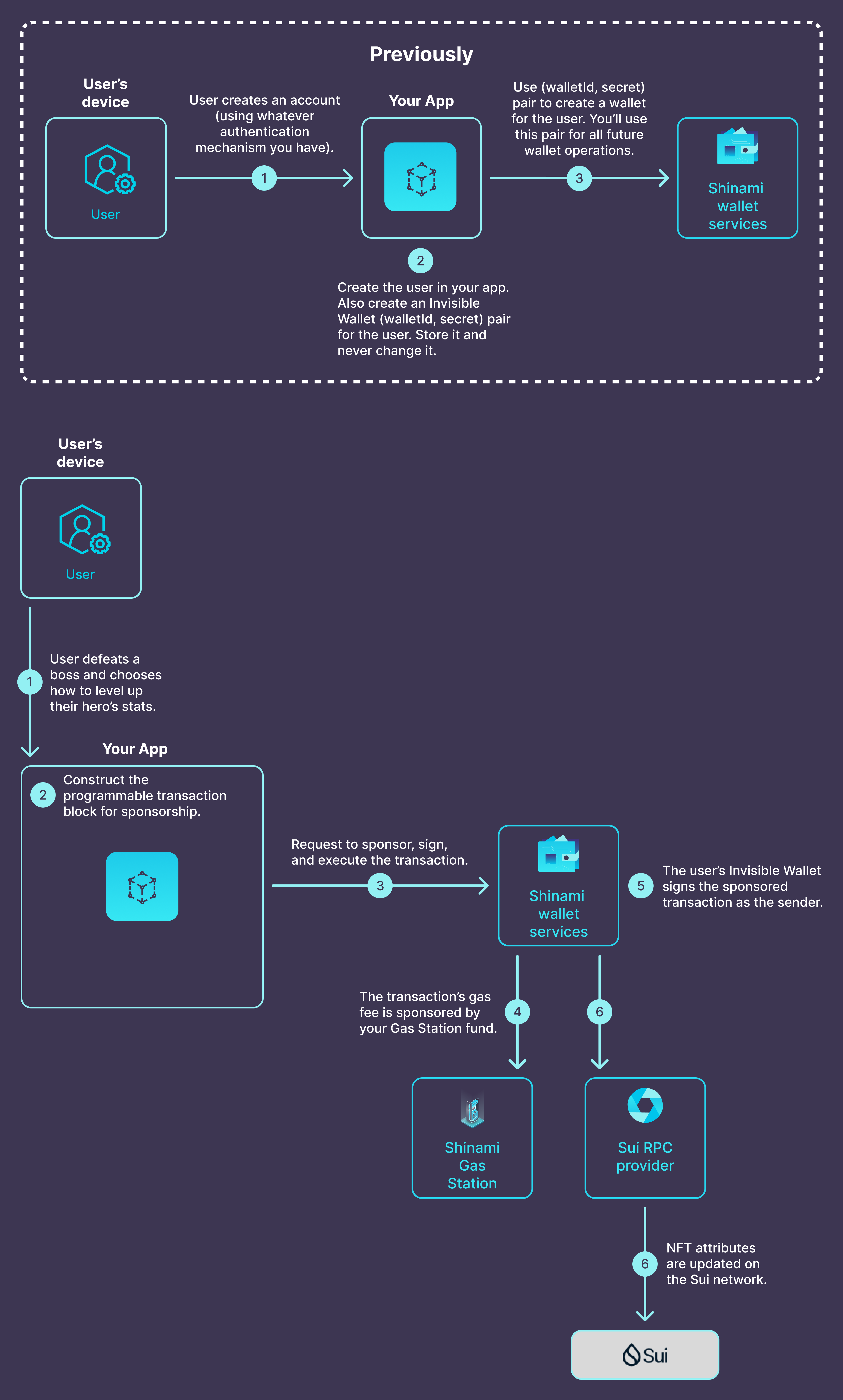
1
The user defeats a boss and earns the right to upgrade their hero’s stats. They decide how to upgrade them and click “Upgrade.”
2
Your app backend constructs the transaction that will upgrade the user’s hero as they chose. It does not contain gas payment information yet.
3
Your app backend sends one request to Shinami to update the player’s NFT onchain, which conveniently does all of the following:
4
Sponsors the transaction’s gas fee using your Gas Station fund.
5
Signs the transaction using the Invisible Wallet for the user.
6
Submits the transaction to the Sui blockchain using an RPC provider.
User-controlled zkLogin Wallets
Image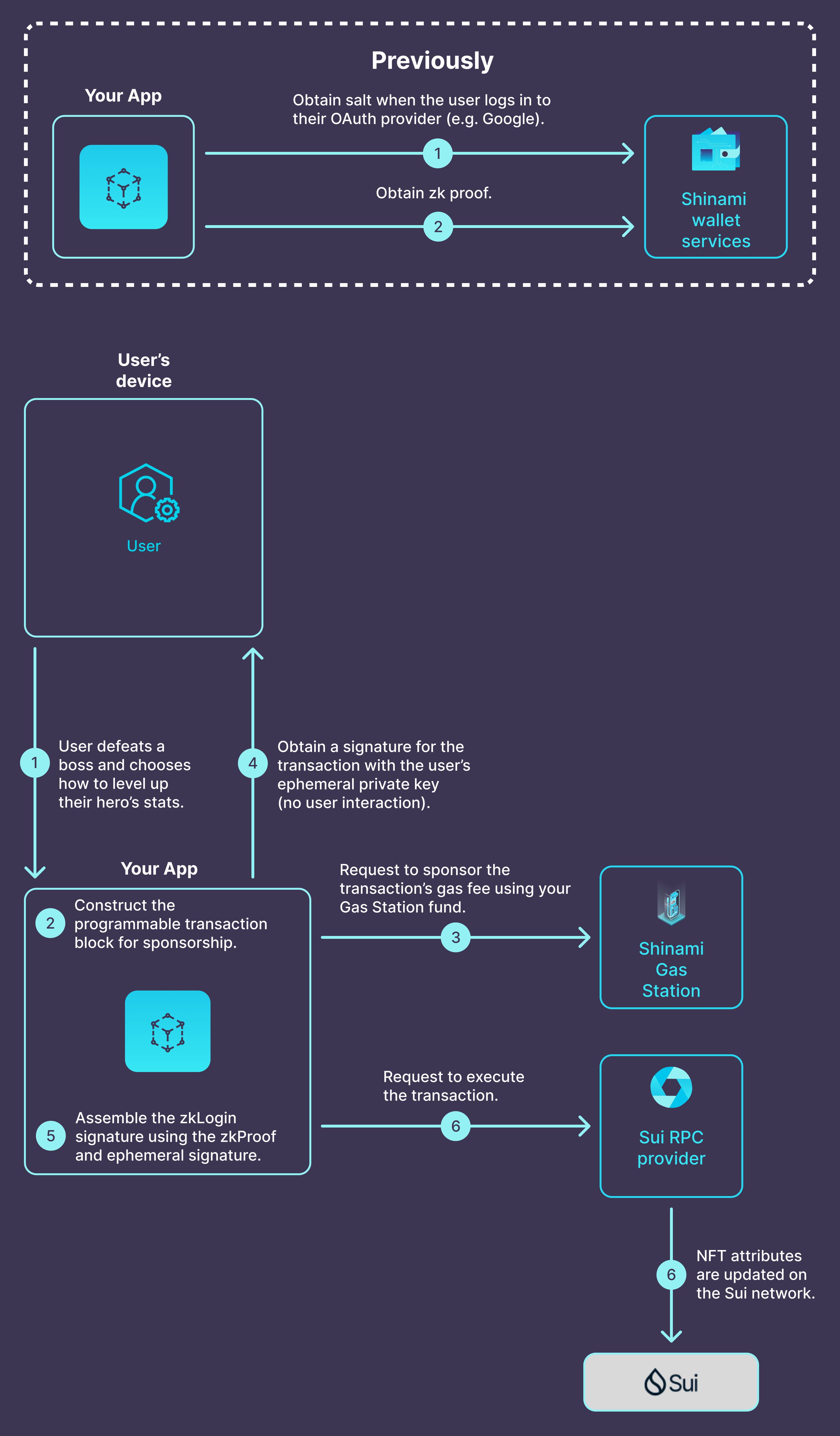
1
The user defeats a boss and earns the right to upgrade their hero’s stats. They decide how to upgrade them and click “Upgrade.”
2
Your app backend constructs a transaction that will upgrade the user’s hero as they chose. It does not contain gas payment information yet.
3
You app backend sends a request to Shinami’s Gas Station to sponsor the transaction and generate a sponsor signature.
4
Your app backend sends a request to the frontend to obtain a signature for the transaction using the user’s ephemeral KeyPair.
5
Your app backend assembles the zkLogin signature for the transaction using the ephemeral KeyPair signature from the frontend and the zkLogin proof you previously obtained for the KeyPair when the user last went through an OAuth login flow.
6
You submit the transaction to a Sui RPC provider. This updates the player’s hero NFT onchain.
Developer resources
App-controlled Invisible Wallets
- For a look at the API, see our Invisible Wallet API.
- For an end-to-end tutorial, see our Invisible Wallet TypeScript Tutorial.
User-controlled zkLogin wallets
- For a look at the API, see our zkLogin wallet API.
- For a template to get started creating your first zkLogin app, see our zkLogin wallet Next.js Tutorial.