> ## Documentation Index
> Fetch the complete documentation index at: https://docs.shinami.com/llms.txt
> Use this file to discover all available pages before exploring further.
# NFTs (non-fungible-tokens)
> A summary of NFTs on Sui with links to key resources
## Overview
NFTs are unique (non-fungible) tokens that represent art, in-game items, tickets, or other items that someone can own, buy, sell, or trade. Each NFT has a unique identifier, or object id, that distinguishes it from other objects on the Sui blockchain. On Sui, an NFTs can be owned by an account or another object. An example of an object owning an NFT might be a NFT representing an in-game character owning a NFT representing a sword. To learn about fungible tokens on Sui - like the SUI coin itself - see [our guide](/developer-guides/sui/move-guides/fungible-tokens).
Read below to see an overview of NFTs and links to relevant tutorials, standards, and sample code.
## NFT minting and dynamic updates
### Smart contracts
NFTs are created and managed using smart contracts (Move packages published to Devnet, Testnet, or Mainnet). A simple example is described in [this Sui Foundation doc](https://docs.sui.io/guides/developer/nft), with a partial code snippet taken from [the associated Move code](https://github.com/MystenLabs/sui/blob/main/examples/move/nft/sources/testnet_nft.move) shown below.
```bash Move expandable theme={null}
// Copyright (c) Mysten Labs, Inc.
// SPDX-License-Identifier: Apache-2.0
module examples::testnet_nft;
use std::string;
use sui::{event, url::{Self, Url}};
/// The struct that represents the NFT.
public struct TestnetNFT has key, store {
id: UID,
name: string::String,
description: string::String,
image_url: Url,
}
/// Function to mint a new NFT and transfer it to the sender.
/// There are no restrictions here on who can mint, or how many
/// mints can take place.
#[allow(lint(self_transfer))]
public fun mint_to_sender(
name: vector,
description: vector,
url: vector,
ctx: &mut TxContext,
) {
let sender = ctx.sender();
/// 1. mint a new NFT with the sender-provided values
let nft = TestnetNFT {
id: object::new(ctx),
name: string::utf8(name),
description: string::utf8(description),
url: url::new_unsafe_from_bytes(url),
};
/// 2. transfer it to the sender
transfer::public_transfer(nft, sender);
}
```
### Minting
A mint is a Move function call to the NFT smart contract. In the contract, you define the rules for which addresses can mint and what they can mint. Examples include:
* Any address can mint, or any address willing to pay a fee
* An wallet with an AdminCap your app controls mints and transfers NFTs to user wallets
* Only addresses with permission can mint. For example, our demo app - described below in the ["Representation example" section](/developer-guides/sui/move-guides/nfts#representation-example) - has an admin wallet that issues mint and upgrade tickets that limit who can mint and which NFTs can be upgrades.
Beyond who can mint, you can place other limits - e.g. only 2,000 can be minted. In a game, it wouldn’t make much sense to limit the core NFTs players use in the game - like an initial hero character or a basic sword - as that would limit the number of players you can have. However, you might place limits on certain rare items like an all-powerful sword in order to maintain their specialness - whether by setting a maximum number, a low likelihood of minting, or other limitations.
### Dynamic NFT updates
A static NFT - like a hip animal PFP - is nice. But it's also nice to have NFTs that can change over time.
**Example one:** a hero NFT could level up its skills as in our game dashboard demo. If a user has a level-up ticket for one of their heroes, they can use it in the function below to increase the hero's stats ([full code is here](https://github.com/shinamicorp/shinami-demo-app/blob/main/move/sources/hero.move#L262)):
```bash Move expandable theme={null}
/// Levels up a hero with a level-up ticket.
public fun level_up_hero(
hero: &mut Hero,
ticket: LevelUpTicket,
damage: u8,
speed: u8,
defense: u8,
) {
let LevelUpTicket { id, hero_id, attribute_points } = ticket;
assert!(object::borrow_id(hero) == &hero_id, EHeroIdMismatch);
assert!(damage + speed + defense == attribute_points, EAttributePointsMismatch);
object::delete(id);
hero.level = hero.level + 1;
hero.damage = hero.damage + damage;
hero.speed = hero.speed + speed;
hero.defense = hero.defense + defense;
}
```
**Example two:** An NFT could represent a ticket, which can be exchanged for entry or an item. Once it's been redeemed, you'll want to mark it as such and potentially update the image url. [Here is an example](https://blog.sui.io/redeemable-nfts/) of doing that when NFT holders used their NFTs to get a cup of coffee.
## Where the data lives
### Off-chain data storage
While NFTs exist on chain, sometimes part of their data does not. The typical off-chain data would be any associated large media files (image, video, audio) - e.g. the full size and thumbnail image of a hero character. The [Sui Object Display](https://docs.sui.io/standards/display) standard controls how NFTs appear in other apps: marketplaces, social media apps, explorers, etc. it includes standard fields such as `image_url` that apps like explorers and marketplaces use to know how to fetch the off-chain data when displaying an NFT.
Examples of off-chain storage include:
* A decentralized storage network such as
* [Walrus](https://www.walrus.xyz/), Mysten Labs' decentralized storage solution for Sui.
* An [IPFS](https://ipfs.tech/) pinning service, such as [Filebase](https://filebase.com/) or [Pinata](https://pinata.cloud/).
* Centralized storage like an AWS S3 bucket + CloudFront CDN.
### Caching
The ultimate truth about an NFT’s ownership and attributes lives in the latest state of the Sui blockchain. However, frequently read data can often be cached (especially in cases where your app controls minting and updating NFTs, and so knows when NFT data changes).
## Ownership, transfer, and sale of NFTs
### Ownership
Games use Shinami Invisible (NFT) Wallets or zkLogin wallets to hold its users NFTs. In both cases, the user doesn't need to remember a seed phrase to manage their wallet - they just need to know how to log into your app or log into the social sign in provider you enable - Google/Facebook/Twitch/etc. With either wallet type, your app determines when and how to tell the user their in-game object is an NFT on the Sui blockchain. For a richer comparison of the different types of user wallets, see our [Wallet Services guide](/product-overviews/sui/wallets).
### Sale and transfer
If using Invisible Wallets or zkLogin wallets, your app can choose when to present the user with an option to sell or trade the NFT to another player. Your app can also provide a means for users to take control of their keys by, for example, creating a cross-app, zkLogin browser wallet with [Sui Wallet](https://suiwallet.com/) and transferring the NFT to it. When a user fully controls their keys, you can use [Kiosks](https://docs.sui.io/standards/kiosk) to enforce transfer rules and collect a royalty if a user sells an in-game item.
### Rental
NFT renting allows an NFT owner to give another wallet temporary access to the privileges that NFT provides. For example, someone can rent a powerful game item for a few days to use in a tournament. For more information and sample code, see [this Sui Foundation doc](https://docs.sui.io/guides/developer/nft/nft-rental).
## Representation example
### UI representation
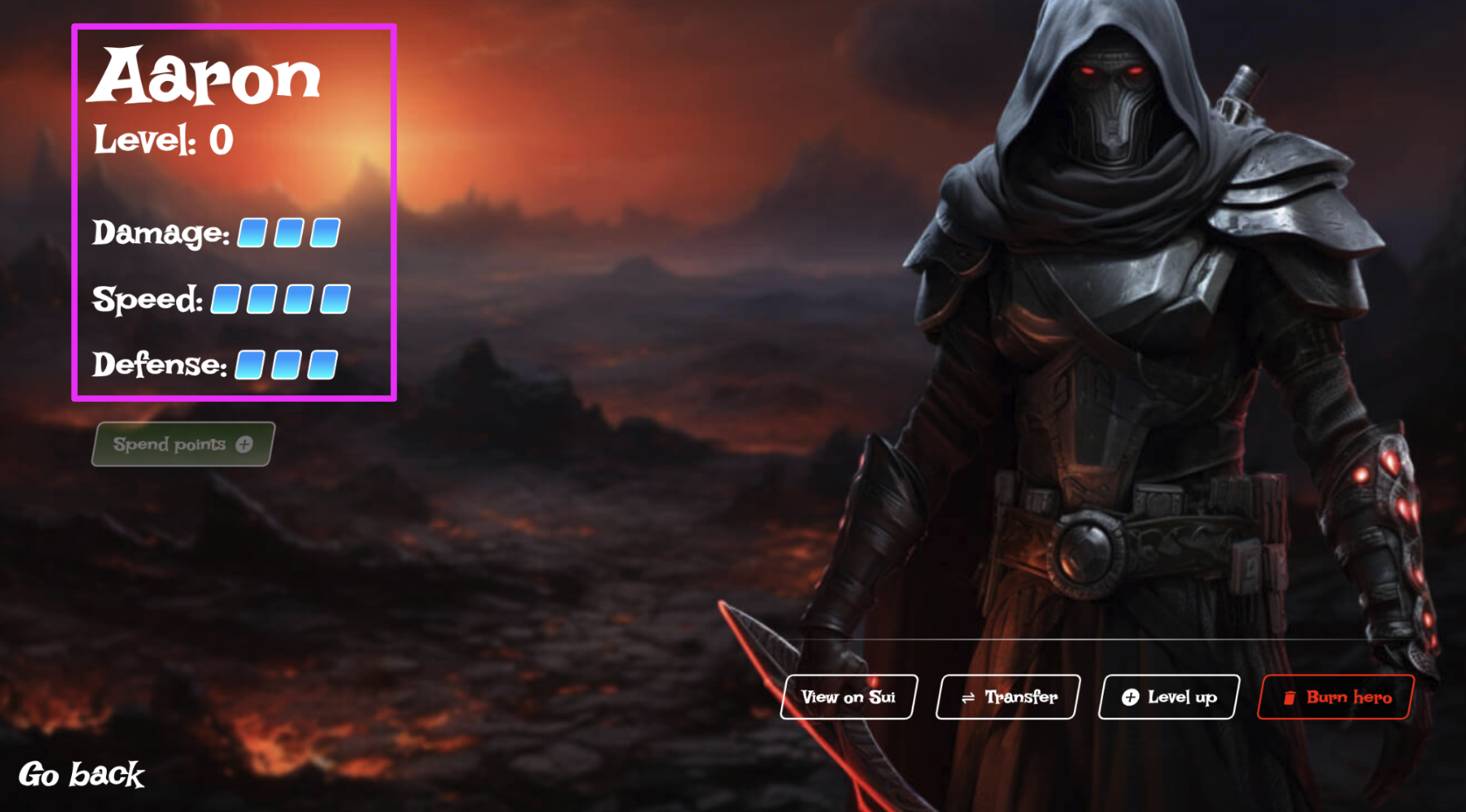
Below is the UI representation of a hero NFT in a player's inventory. It's from our [game dashboard demo](https://demo.shinami.com/) - you'll need a [Shinami developer account](https://auth.app.shinami.com/u/signup) to log into it.
 ### On-chain representation
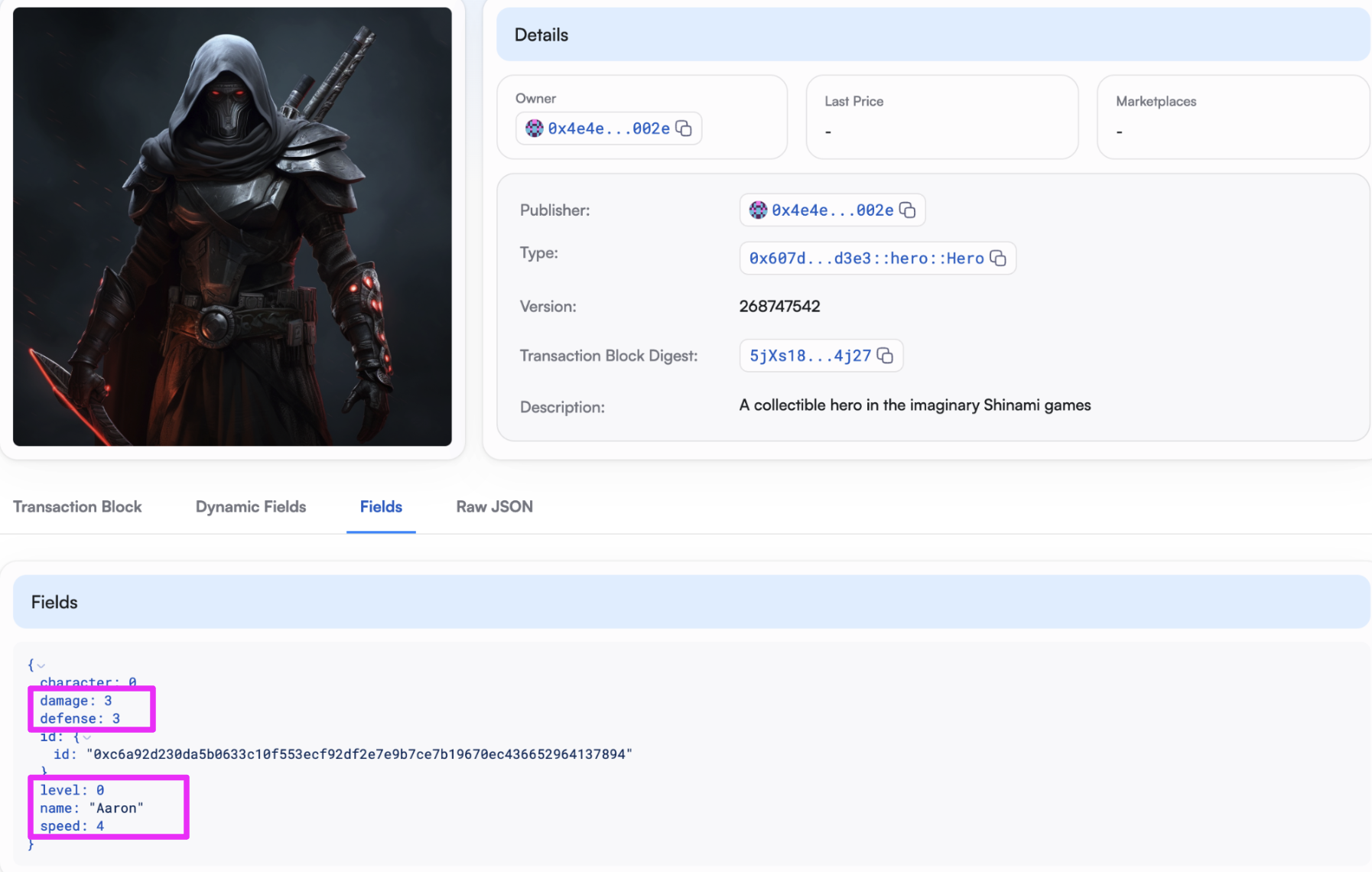
Here is that same hero on-chain, as shown in the [SuiVision explorer](https://testnet.suivision.xyz/object/0xc6a92d230da5b0633c10f553ecf92df2e7e9b7ce7b19670ec436652964137894?tab=Fields):
### On-chain representation
Here is that same hero on-chain, as shown in the [SuiVision explorer](https://testnet.suivision.xyz/object/0xc6a92d230da5b0633c10f553ecf92df2e7e9b7ce7b19670ec436652964137894?tab=Fields):
 ### Move representation
Finally, here is the move struct for defining a hero ([full Move package code](https://github.com/shinamicorp/shinami-demo-app/blob/main/move/sources/hero.move#L20)):
```bash Move theme={null}
/// A collectible hero in the imaginary Shinami games.
/// Can be tranferred freely.
struct Hero has key, store {
id: UID,
// Immutable attributes
character: u8,
// Mutable attributes
name: String,
level: u8,
damage: u8,
speed: u8,
defense: u8,
}
```
We have a [tutorial](/developer-guides/sui/tutorials/zklogin-demo-app) explaining how the demo works, including minting NFTs, that also shows you how to run it if you wish. If you're looking for practice publishing a Move package that mints and upgrades NFTs only for players authorized to do so, it's a great resource.
## Resources
### Official standards and resources
* [Sui Object Display standard](https://docs.sui.io/standards/display)
* [Sui Kiosk overview and sample code](https://docs.sui.io/standards/kiosk)
### Community tools and resources
* Suiet wallet outlines [the fields they look at when displaying an NFT](https://std.suiet.app/nft/)
* [Origin Byte:](https://github.com/Origin-Byte/nft-protocol/tree/main) a collection of tools and protocols to help developers with NFTs and NFT collections.
### Developer Tutorials
* Sui Foundation [simple example](https://docs.sui.io/guides/developer/nft) to publish a Move package where anyone can mint an NFT.
* Shinami [game dashboard demo tutorial](https://docs.sui.io/guides/developer/nft) to publish a Move package where an admin wallet you control has the right to issue mint NFT and upgrade NFT tickets to users, who pass them in to the associated mint and upgrade function calls. It also runs the demo's Next.js app so you can log in as a user and mint an NFT to your auto-created zkLogin wallet.
* [Sui Foundation NFT rental example](https://docs.sui.io/guides/developer/nft/nft-rental)
### Top Sui NFT marketplaces
* [suiscan last 30 day marketplace activity](https://suiscan.xyz/mainnet/nfts/marketplaces)
## Common questions
### I'm seeing a lot of broken links when I fetch NFT data
When you use [`suix_getOwnedObjects`](/api-docs/sui/node-service/json-rpc/read-api-objects-coins#suix-getownedobjects), [`suiGetObject`](/api-docs/sui/node-service/json-rpc/read-api-objects-coins#sui-getobject), and [`sui_multiGetObjects`](/api-docs/sui/node-service/json-rpc/read-api-objects-coins#sui-multigetobjects) with `showDisplay: true` you may see a lot of `image_url` values that are broken (404s).
Because of abandoned projects and scams that airdrop NFTs to a lot of addresses, this is fairly common. Search for the project to see if it seems legit. You can also look up the package on Suiscan, which has scam warnings. For example, this NFT (we also set `showType: true`):
```TypeScript theme={null}
{
objectId: '0x8bdf47e4e77d5eeba5b9a044c6c2f8511ce64ca75682c0fb5389de9a26a422b8',
version: '446027767',
digest: 'FiGZywnDRCsysWVyNkp37Be9yhHPpxw6bUb43NE1h3zX',
type: '0xbdcda1902faf59c4c1896544d819b6c0299263712a9d6a4a809fbad4bab93901::nft_claim::SendClaimNFT',
display: {
data: {
description: 'This NFT is your claim to SEND Tokens. Do not burn or transfer it to someonen else.',
image_url: 'https://nk.up.railway.app/nft.png',
name: 'SEND Claim NFT'
},
error: null
}
}
```
Searching the package - `0xbdcda1902faf59c4c1896544d819b6c0299263712a9d6a4a809fbad4bab93901` - [on Suiscan](https://suiscan.xyz/mainnet/collection/0xbdcda1902faf59c4c1896544d819b6c0299263712a9d6a4a809fbad4bab93901::nft_claim::SendClaimNFT/items) shows:
### Move representation
Finally, here is the move struct for defining a hero ([full Move package code](https://github.com/shinamicorp/shinami-demo-app/blob/main/move/sources/hero.move#L20)):
```bash Move theme={null}
/// A collectible hero in the imaginary Shinami games.
/// Can be tranferred freely.
struct Hero has key, store {
id: UID,
// Immutable attributes
character: u8,
// Mutable attributes
name: String,
level: u8,
damage: u8,
speed: u8,
defense: u8,
}
```
We have a [tutorial](/developer-guides/sui/tutorials/zklogin-demo-app) explaining how the demo works, including minting NFTs, that also shows you how to run it if you wish. If you're looking for practice publishing a Move package that mints and upgrades NFTs only for players authorized to do so, it's a great resource.
## Resources
### Official standards and resources
* [Sui Object Display standard](https://docs.sui.io/standards/display)
* [Sui Kiosk overview and sample code](https://docs.sui.io/standards/kiosk)
### Community tools and resources
* Suiet wallet outlines [the fields they look at when displaying an NFT](https://std.suiet.app/nft/)
* [Origin Byte:](https://github.com/Origin-Byte/nft-protocol/tree/main) a collection of tools and protocols to help developers with NFTs and NFT collections.
### Developer Tutorials
* Sui Foundation [simple example](https://docs.sui.io/guides/developer/nft) to publish a Move package where anyone can mint an NFT.
* Shinami [game dashboard demo tutorial](https://docs.sui.io/guides/developer/nft) to publish a Move package where an admin wallet you control has the right to issue mint NFT and upgrade NFT tickets to users, who pass them in to the associated mint and upgrade function calls. It also runs the demo's Next.js app so you can log in as a user and mint an NFT to your auto-created zkLogin wallet.
* [Sui Foundation NFT rental example](https://docs.sui.io/guides/developer/nft/nft-rental)
### Top Sui NFT marketplaces
* [suiscan last 30 day marketplace activity](https://suiscan.xyz/mainnet/nfts/marketplaces)
## Common questions
### I'm seeing a lot of broken links when I fetch NFT data
When you use [`suix_getOwnedObjects`](/api-docs/sui/node-service/json-rpc/read-api-objects-coins#suix-getownedobjects), [`suiGetObject`](/api-docs/sui/node-service/json-rpc/read-api-objects-coins#sui-getobject), and [`sui_multiGetObjects`](/api-docs/sui/node-service/json-rpc/read-api-objects-coins#sui-multigetobjects) with `showDisplay: true` you may see a lot of `image_url` values that are broken (404s).
Because of abandoned projects and scams that airdrop NFTs to a lot of addresses, this is fairly common. Search for the project to see if it seems legit. You can also look up the package on Suiscan, which has scam warnings. For example, this NFT (we also set `showType: true`):
```TypeScript theme={null}
{
objectId: '0x8bdf47e4e77d5eeba5b9a044c6c2f8511ce64ca75682c0fb5389de9a26a422b8',
version: '446027767',
digest: 'FiGZywnDRCsysWVyNkp37Be9yhHPpxw6bUb43NE1h3zX',
type: '0xbdcda1902faf59c4c1896544d819b6c0299263712a9d6a4a809fbad4bab93901::nft_claim::SendClaimNFT',
display: {
data: {
description: 'This NFT is your claim to SEND Tokens. Do not burn or transfer it to someonen else.',
image_url: 'https://nk.up.railway.app/nft.png',
name: 'SEND Claim NFT'
},
error: null
}
}
```
Searching the package - `0xbdcda1902faf59c4c1896544d819b6c0299263712a9d6a4a809fbad4bab93901` - [on Suiscan](https://suiscan.xyz/mainnet/collection/0xbdcda1902faf59c4c1896544d819b6c0299263712a9d6a4a809fbad4bab93901::nft_claim::SendClaimNFT/items) shows:
