> ## Documentation Index
> Fetch the complete documentation index at: https://docs.shinami.com/llms.txt
> Use this file to discover all available pages before exploring further.
# Invisible Wallet API v2 (current version)
> App-controlled embedded wallets for a smooth UX
## v1->v2 Migration guide
**Action required:** You must migrate to v2 of our Invisible Wallet API (this version) by end of UTC day July 30. Support for v1 of the API ends at that time. See migration guide below.
Migrating from [API v1](/api-docs/sui/wallet-services/invisible-wallet-api-v1) involves the following changes:
1. Change the wallet service URL of your requests from `https://api.us1.shinami.com/sui/wallet/v1` to `https://api.us1.shinami.com/sui/wallet/v2`. **Important:** key service URL is not changing. It stays as v1: `https://api.us1.shinami.com/sui/key/v1`.
2. Do not send the following requests, which are no longer supported: `shinami_walx_setBeneficiary`, `shinami_walx_unsetBeneficiary`, `shinami_walx_getBeneficiary`.
3. If you send `shinami_wal_executeGaslessTransactionBlock`, adjust to [the updated request and response bodies](/api-docs/sui/wallet-services/invisible-wallet-api#shinami_wal_executegaslesstransactionblock), which is now aligned with Mysten's gRPC version of executeTransactionBlock.
We will soon be releasing a Shinami clients SDK update that has breaking changes to support [v2 of the Sui TypeScript SDK](https://github.com/MystenLabs/ts-sdks/blob/main/packages/sui/CHANGELOG.md) (which has the latest support for gRPC). We will include native support for Invisible Wallet API v2 in this SDK update.
## Overview
Shinami’s Invisible Wallets abstract away Web3 elements like seed phrases, third-party wallet connections, gas fees, and signing popups. They are embedded, backend wallets under the shared custody of your app and Shinami. Both parties must cooperate in order to obtain a valid signature.
You'll find API endpoints and key usage notes below. If you ever need help you can [reach out to us](/help-center/overview#contacting-support).
### Use Cases
Core use cases include app-managed NFTs or closed-loop tokens. For a breakdown of the wallets we offer and wallet use-cases, see our [high-level guide](/product-overviews/sui/wallets#wallet-services-overview).
### Shinami Gas Station Integration
All methods below that write to the Sui blockchain have their gas fees sponsored by you via a Gas Station you create (see the [Sui Gas Station FAQ page of our Help Center](/help-center/sui/gas-station-faq) for how guidance on how to set up a fund and add free Testnet Sui to it). This is because Invisible Wallets are designed to easily onboard Web2-native users (who may not want to download a wallet app, manage a seed phrase, and complete KYC checks to buy SUI for gas).
### Authentication, Rate Limits and Error Handling
**Authentication**
You authenticate via an access key passed in a header ('X-Api-Key: ACCESS\_KEY') or in the request url, e.g. `https://api.us1.shinami.com/sui/wallet/v2/ACCESS_KEY`. We recommend using a request header and not putting access keys in your request URLs for reduced visibility (in logs, etc). These steps are done automatically by our [TypeScript SDK](https://www.npmjs.com/package/@shinami/clients).
For more information, including how to set up an access key with Wallet Services rights, see our [Authentication and API Keys](/developer-guides/core-integration-topics/authentication-and-api-keys) guide.
**Call this API from your backend**
Shinami Wallet Services do not support CORS requests, so if you call these APIs from your frontend you'll get a CORS error. This is for security reasons: exposed keys and wallet information could lead to malicious actors signing transactions on behalf of your users.
**Rate Limits**
When you surpass the QPS limit for a key, we return a JSON-RPC error code `-32010`. We recommend implementing retries with a backoff to handle any rate limits errors that arise. You can also [adjust the rate limits of your keys](/developer-guides/core-integration-topics/authentication-and-api-keys#update-a-key%E2%80%99s-qps%2Fcups-values) to better balance your QPS allotment across your keys.
**Error Handling**
See our Error Reference for guidance on the errors you may receive from our services, including a section on errors specific to the [Invisible Wallet API](/developer-guides/core-integration-topics/error-reference#sui-invisible-wallet-api).
### WalletId and Secret Pairing
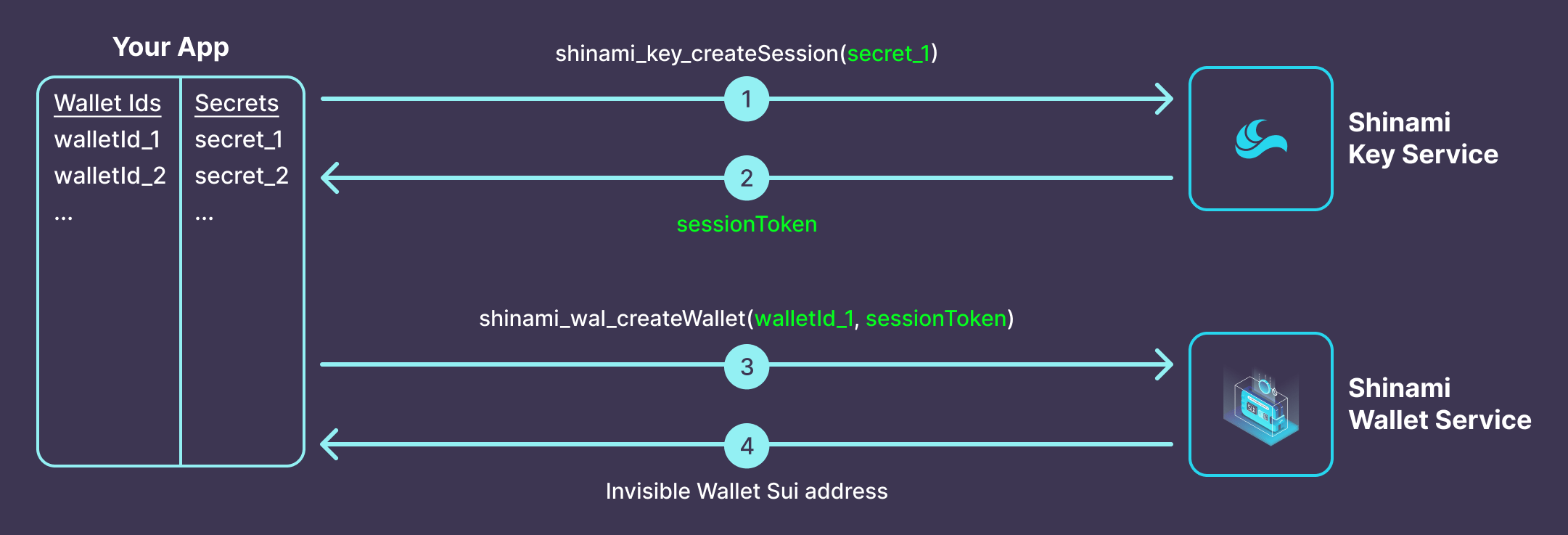
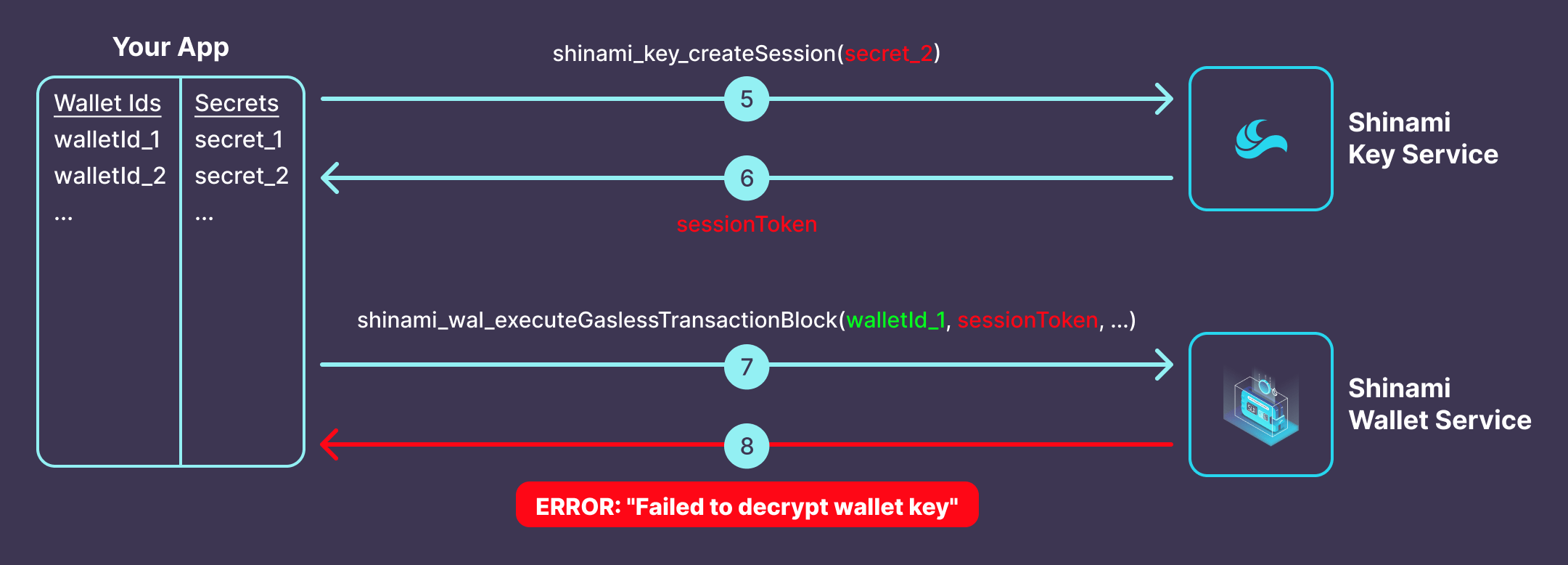
*When you create an Invisible Wallet, you must create, store, link, and never change the following two values*:
* `walletId`: Your internal id for a wallet. When you provide us a `walletId` in a method call, it tells us which Invisible Wallet to use. It could be your internal `userId` value, or a new arbitrary and unique value you link to the `userId`.
* `secret`: Your internal secret for a wallet. The `sessionToken` you generate with it is combined with Shinami data to obtain a signature from the associated wallet. Ideally it would be different for each wallet so that if one `secret` is compromised the rest are not.
**When you create an Invisible Wallet, you forever link its walletId it to the secret you used:**
 **So, if you try to use the walletId with a different secret, you'll get an error:**
 ### Tutorial with E2E sample code
Check out our [TypeScript tutorial](/developer-guides/sui/tutorials/invisible-wallets) for more code samples and details on the end-to-end flow of creating and using Invisible Wallets to execute sponsored transactions.
## Methods
### shinami\_key\_createSession
For security purposes, you must generate a session token before you create a wallet, or sign or execute transactions. Session tokens are valid and can be reused for 10 minutes.
You may also use an instance of `ShinamiWalletSigner` to manage session token generation and refreshes for a given wallet. This is shown in the methods below that have a `sessionToken` parameter in an additional sample code tab.
**Request Parameters**
| Name | Type | Description |
| :----- | :----- | :--------------------------------------------------------------------------------------------------------------------------------------------------------------------------------------------------------------------------------------------------------------------- |
| secret | string | Used to encrypt and decrypt a wallet's private key. Therefore, it must always be used with the same `walletId` and cannot be changed in the future (see [walletId and secret pairing](/api-docs/sui/wallet-services/invisible-wallet-api#walletid-and-secret-pairing)) |
**Example Request Template**
The TypeScript example uses the [Shinami Clients SDK](https://www.npmjs.com/package/@shinami/clients), which you can install with:
```bash Shell theme={null}
npm install @shinami/clients
```
Replace all instances of `{{name}}` with the actual value for that name.
```bash cURL theme={null}
curl https://api.us1.shinami.com/sui/key/v1 \
-X POST \
-H 'X-API-Key: {{walletAccessKey}}' \
-H 'Content-Type: application/json' \
-d '{
"jsonrpc":"2.0",
"method":"shinami_key_createSession",
"params":[
"{{secret}}"
],
"id":1
}'
```
```bash Shinami TypeScript SDK theme={null}
import { KeyClient } from "@shinami/clients/sui";
const key = new KeyClient({{walletAccessKey}});
const sessionToken = await key.createSession({{secret}});
```
**Example Response**
```bash cURL theme={null}
{
"jsonrpc":"2.0",
"result":"eyJraWQiOiJrZXkyMDIzMDgxMSIsImVuYyI6IkEyNTZHQ00iLCJ0YWciOiI4SVpQWXlHeDlmOTd6U2NIdmN6N3lnIiwiYWxnIjoiQTI1NkdDTUtXIiwiaXYiOiJQWVJXZFJrbnNMMlNnVzhfIn0.ygDCI-NcvUcH7wYc0Bp0-59qeIfGOqLyXZGsLF4pW0M.aOAW0AwBvAWpaS-S.QmesdNIdNIYbT59RET-lNuzNMUvS-xb2exhXrAIlspnIkV3nuBx7PKC_GgJ7C1EqJx3tDtQaLLDGdrO8_s-75oK88ls5mzDRR-w2A0VdCcTH0_JwsQgijIbCKFWS0g.dULMzxZ4gGbm2unqOnzv8w",
"id": 1
}
```
```bash Shinami TypeScript SDK theme={null}
"eyJraWQiOiJrZXkyMDIzMDgxMSIsImVuYyI6IkEyNTZHQ00iLCJ0YWciOiI4SVpQWXlHeDlmOTd6U2NIdmN6N3lnIiwiYWxnIjoiQTI1NkdDTUtXIiwiaXYiOiJQWVJXZFJrbnNMMlNnVzhfIn0.ygDCI-NcvUcH7wYc0Bp0-59qeIfGOqLyXZGsLF4pW0M.aOAW0AwBvAWpaS-S.QmesdNIdNIYbT59RET-lNuzNMUvS-xb2exhXrAIlspnIkV3nuBx7PKC_GgJ7C1EqJx3tDtQaLLDGdrO8_s-75oK88ls5mzDRR-w2A0VdCcTH0_JwsQgijIbCKFWS0g.dULMzxZ4gGbm2unqOnzv8w"
```
**Response Fields**
| Name | Type | Description |
| :----- | :----- | :--------------------------------------------------------------------------------------------- |
| result | string | `sessionToken` corresponding to the provided `secret`. Valid and can be reused for 10 minutes. |
### shinami\_wal\_createWallet
Programmatically generates a unique wallet for a user that is Sui network agnostic (has the same address on Devnet, Testnet, and Mainnet). On the free tier you have a limit of wallet creations per month as shown on the "Sui Wallet Services" tab of the [billing page](https://app.shinami.com/billing/) in your dashboard (where you can also see how to upgrade if needed). If you hit this limit, you will get a [JSON-RPC code `-32012`](/developer-guides/core-integration-topics/error-reference#sui-invisible-wallet-api) and should not retry. All other wallet operations will still work for the month, like signing with wallets you've already created.
**Each `walletId` only works with the `secret` you create it with (via the `sessionToken` you pass to this method). Your application MUST remember the (`walletId`, `secret`) pair associated with each Invisible Wallet you create. If you forget or change either of these values, the wallet's private key will be lost and we cannot recover it for you.**
**Request Parameters**
| Name | Type | Description |
| :----------- | :----- | :-------------------------------------------------------------------------------------------------------------------------------------------------------------------------------------------------------------------------------- |
| walletId | string | A unique ID you maintain for the wallet. Can be based on your internal user IDs. **Note:** you cannot change this value in the future, so do not use a value that you or your users might change, such as an editable `username`. |
| sessionToken | string | The token generated by `shinami_key_createSession` with the unalterable secret you will permanently associate with this walletId (and, ideally, only this walletId). |
**Example Request Template**
The TypeScript example uses the [Shinami Clients SDK](https://www.npmjs.com/package/@shinami/clients), which you can install with:
```bash Shell theme={null}
npm install @shinami/clients
```
Replace all instances of `{{name}}` with the actual value for that name.
```bash cURL theme={null}
curl https://api.us1.shinami.com/sui/wallet/v2 \
-X POST \
-H 'X-API-Key: {{walletAccessKey}}' \
-H 'Content-Type: application/json' \
-d '{
"jsonrpc": "2.0",
"method": "shinami_wal_createWallet",
"params": [
"{{walletId}}",
"{{sessionToken}}"
],
"id": 1
}'
```
```bash Shinami TypeScript SDK theme={null}
import { WalletClient } from "@shinami/clients/sui";
const walletClient = new WalletClient({{walletAccessKey}});
const walletAddress = await walletClient.createWallet(
{{walletId}},
{{sessionToken}}
);
```
```bash Shinami TypeScript SDK using ShinamiWalletSigner expandable theme={null}
import {
WalletClient,
KeyClient,
ShinamiWalletSigner
} from "@shinami/clients/sui";
const keyClient = new KeyClient({{walletAccessKey}});
const walletClient = new WalletClient({{walletAccessKey}});
const signer = new ShinamiWalletSigner(
{{walletId}},
walletClient,
{{walletSecret}},
keyClient
);
// Returns the Sui address of the invisible wallet,
// creating it if it hasn't been created yet.
const CREATE_WALLET_IF_NOT_FOUND = true;
const walletAddress = await signer.getAddress(CREATE_WALLET_IF_NOT_FOUND);
```
**Example Response**
```bash cURL theme={null}
{
"jsonrpc":"2.0",
"result":"0xecaeb4a763dd49f2cd13aeaf2e7ab01f704bbc8c2bd9c2e991b726d0632c3b4f",
"id":1
}
```
```bash Shinami TypeScript SDK theme={null}
"0xecaeb4a763dd49f2cd13aeaf2e7ab01f704bbc8c2bd9c2e991b726d0632c3b4f"
```
```bash Shinami TypeScript SDK using ShinamiWalletSigner expandable theme={null}
"0xecaeb4a763dd49f2cd13aeaf2e7ab01f704bbc8c2bd9c2e991b726d0632c3b4f"
```
**Response Data**
| Type | Description |
| :----- | :-------------------------------------------------------------------------------------------------------------------------------------------------- |
| String | The Sui address of the Invisible Wallet created for this walletId. Network-agnostic (the address will be the same on Devnet, Testnet, and Mainnet). |
### shinami\_wal\_getWallet
Retrieve a user's wallet address based your unique walletId value for it.
**Request Parameters**
| Name | Type | Description |
| :------- | :----- | :------------------------------------------------------------ |
| walletId | string | Your unique, internal id for the associated Invisible Wallet. |
**Example Request Template**
The TypeScript example uses the [Shinami Clients SDK](https://www.npmjs.com/package/@shinami/clients), which you can install with:
```bash Shell theme={null}
npm install @shinami/clients
```
Replace all instances of `{{name}}` with the actual value for that name.
```bash cURL theme={null}
curl https://api.us1.shinami.com/sui/wallet/v2 \
-X POST \
-H 'X-API-Key: {{walletAccessKey}}' \
-H 'Content-Type: application/json' \
-d '{
"jsonrpc":"2.0",
"method":"shinami_wal_getWallet",
"params":[
"{{walletId}}"
],
"id":1
}'
```
```bash Shinami TypeScript SDK theme={null}
import { WalletClient } from "@shinami/clients/sui";
const walletClient = new WalletClient({{walletAccessKey}});
const walletAddress = await walletClient.getWallet(
{{walletId}}
);
```
```bash Shinami TypeScript SDK using ShinamiWalletSigner expandable theme={null}
import {
WalletClient,
KeyClient,
ShinamiWalletSigner
} from "@shinami/clients/sui";
const keyClient = new KeyClient({{walletAccessKey}});
const walletClient = new WalletClient({{walletAccessKey}});
const signer = new ShinamiWalletSigner(
{{walletId}},
walletClient,
{{walletSecret}},
keyClient
);
const walletAddress = await signer.getAddress();
```
**Example Response**
```bash cURL theme={null}
{
"jsonrpc":"2.0",
"result":"0xecaeb4a763dd49f2cd13aeaf2e7ab01f704bbc8c2bd9c2e991b726d0632c3b4f",
"id":1
}
```
```bash Shinami TypeScript SDK theme={null}
"0xecaeb4a763dd49f2cd13aeaf2e7ab01f704bbc8c2bd9c2e991b726d0632c3b4f"
```
```bash Shinami TypeScript SDK using ShinamiWalletSigner theme={null}
"0xecaeb4a763dd49f2cd13aeaf2e7ab01f704bbc8c2bd9c2e991b726d0632c3b4f"
```
**Response Fields**
| Type | Description |
| :----- | :-------------------------------------------------------------------------------------------------------------------------------------------------- |
| String | The Sui address of the Invisible Wallet created for this walletId. Network-agnostic (the address will be the same on Devnet, Testnet, and Mainnet). |
### shinami\_wal\_signTransactionBlock
Signs a fully constructed transaction so that it can be executed. This is a low level API - it requires integration with [Gas Station API](/api-docs/sui/gas-station/api) for transaction sponsorship (if needed) and an RPC provider for transaction execution. This method gives you more control over how you submit transactions to Sui compared to `shinami_wal_executeGaslessTransactionBlock`, which sponsors, signs, and executes an Invisible Wallet transaction in one method call.
**Request Parameters**
| Name | Type | Description |
| :----------- | :------------------------------------ | :-------------------------------------------------------------------------------------------------------------------------------------------------------------------------------------------------------------- |
| walletId | string | Your unique, internal id for the associated Invisible Wallet. |
| sessionToken | string | The token generated by `shinami_key_createSession` with the same secret you used when creating this wallet. |
| txBytes | SDK: string \| Uint8ArraycURL: string | BCS serialized TransactionData, which includes gas data. It lacks only the sender's signature (which this method generates) before it can be submitted to the chain. If `string`, assumed to be Base64 encoded. |
**Example Request Template**
The TypeScript example uses the [Shinami Clients SDK](https://www.npmjs.com/package/@shinami/clients), which you can install with:
```bash Shell theme={null}
npm install @shinami/clients
```
Replace all instances of `{{name}}` with the actual value for that name.
```bash cURL theme={null}
curl https://api.us1.shinami.com/sui/wallet/v2 \
-X POST \
-H 'X-API-Key: {{walletAccessKey}}' \
-H 'Content-Type: application/json' \
-d '{
"jsonrpc": "2.0",
"method": "shinami_wal_signTransactionBlock",
"params": [
"{{walletId}}",
"{{sessionToken}}",
"{{txBytes}}"
],
"id": 1
}'
```
```bash Shinami TypeScript SDK theme={null}
import { WalletClient } from "@shinami/clients/sui";
const walletClient = new WalletClient({{walletAccessKey}});
const { signature, txDigest } = await walletClient.signTransaction(
{{walletId}},
{{sessionToken}},
{{txBytes}}
)
```
```bash Shinami TypeScript SDK using ShinamiWalletSigner expandable theme={null}
import {
WalletClient,
KeyClient,
ShinamiWalletSigner
} from "@shinami/clients/sui";
const keyClient = new KeyClient({{walletAccessKey}});
const walletClient = new WalletClient({{walletAccessKey}});
const signer = new ShinamiWalletSigner(
{{walletId}},
walletClient,
{{walletSecret}},
keyClient
);
const { signature, txDigest } = await signer.signTransaction(
{{txBytes}}
);
```
**Example Response**
```bash cURL theme={null}
{
"jsonrpc":"2.0",
"result":{
"signature":"AKzbe4FlhuT9saKFDUEdmCELBVa/NhsERc2XPahGC+8Ar6YMoK+DH+xs8xg/RSYF7HeZ4UmwnSPJFZpYjgWWZQB51Goyfzm4soRhJY9gDmt/wDZYCm81bkCP87eBm1T+Xw==",
"txDigest":"BSFD6oDgftrtcVCZF8EAkUcmWWyd8ZRsMCGSh6EbtqCj"
},
"id":1
}
```
```bash Shinami TypeScript SDK theme={null}
{
signature: 'AKzbe4FlhuT9saKFDUEdmCELBVa/NhsERc2XPahGC+8Ar6YMoK+DH+xs8xg/RSYF7HeZ4UmwnSPJFZpYjgWWZQB51Goyfzm4soRhJY9gDmt/wDZYCm81bkCP87eBm1T+Xw==',
txDigest: 'BSFD6oDgftrtcVCZF8EAkUcmWWyd8ZRsMCGSh6EbtqCj'
}
```
```bash Shinami TypeScript SDK using ShinamiWalletSigner theme={null}
{
signature: 'AKzbe4FlhuT9saKFDUEdmCELBVa/NhsERc2XPahGC+8Ar6YMoK+DH+xs8xg/RSYF7HeZ4UmwnSPJFZpYjgWWZQB51Goyfzm4soRhJY9gDmt/wDZYCm81bkCP87eBm1T+Xw==',
txDigest: 'BSFD6oDgftrtcVCZF8EAkUcmWWyd8ZRsMCGSh6EbtqCj'
}
```
**Response Fields**
| Name | Type | Description |
| :-------- | :----- | :----------------------------------------------------------------------------------------------------------------------------------------------------------------------------------------------------- |
| signature | string | Base64 encoded transaction signature, signed by the wallet key. To be used alongside the `txBytes` sent to this method and the gas sponsor's signature (if applicable) when executing the transaction. |
| txDigest | string | Base 58 encoded transaction digest. |
### shinami\_wal\_signPersonalMessage
Signs a personal message using an Invisible Wallet. The signature can be verified with the `PersonalMessage` intent scope. The request template below titled `End-to-end example with ShinamiWalletSigner - Shinami TS SDK` shows an end-to-end example of signing and a message and verifying a signature.
**Request Parameters**
| Name | Type | Description |
| :----------- | :------ | :------------------------------------------------------------------------------------------------------------------------------------------------------------------------------------------ |
| walletId | string | Your unique, internal id for the associated Invisible Wallet. |
| sessionToken | string | The token generated by `shinami_key_createSession` with the same secret you used when creating this wallet. |
| message | string | Message bytes to be signed. See an example in the request template below titled `End-to-end example with ShinamiWalletSigner - Shinami TS SDK` |
| wrapBcs | boolean | Optional. Set it to `true` when calling the API directly to match the verification behavior of the Sui TypeScript SDK. When using the Shinami TypeScript SDK it's set to `true` by default. |
**Example Request Template**
The TypeScript example uses the [Shinami Clients SDK](https://www.npmjs.com/package/@shinami/clients), which you can install with:
```bash Shell theme={null}
npm install @shinami/clients
```
Replace all instances of `{{name}}` with the actual value for that name.
```bash cURL theme={null}
curl https://api.us1.shinami.com/sui/wallet/v2 \
-X POST \
-H 'X-API-Key: {{walletAccessKey}}' \
-H 'Content-Type: application/json' \
-d '{
"jsonrpc": "2.0",
"method": "shinami_wal_signPersonalMessage",
"params": [
"{{walletId}}",
"{{sessionToken}}",
"{{message}}",
{{wrapBCs}}
],
"id": 1
}'
```
```bash Shinami TypeScript SDK - template theme={null}
import { WalletClient } from "@shinami/clients/sui";
const walletClient = new WalletClient({{walletAccessKey}});
const signature = await walletClient.signPersonalMessage(
{{walletId}},
{{sessionToken}},
{{message}},
{{wrapBCS}} // optional, defaults to true if not provided
);
```
```bash End-to-end example with ShinamiWalletSigner - Shinami TS SDK expandable theme={null}
import {
WalletClient,
KeyClient,
ShinamiWalletSigner
} from "@shinami/clients/sui";
import { verifyPersonalMessage } from '@mysten/sui.js/verify';
const walletClient = new WalletClient({{walletAccessKey}});
const key = new KeyClient({{walletAccessKey}});
const signer = new ShinamiWalletSigner(
{{walletId}},
walletClient,
{{walletSecret}},
keyClient
);
// encode the as a base64 string
const message = "I have the private keys.";
const messageAsBase64String = btoa(message);
// use Shinami Wallet Service to sign the message
const signature = await signer.signPersonalMessage(
messageAsBase64String
);
// When we check the signature, we encode the message as a byte array
// and not a base64 string like when we signed it
const messageBytes = new TextEncoder().encode(message);
// Failure throws a `Signature is not valid for the provided message` Error
const publicKey = await verifyPersonalMessage(messageBytes, signature);
// Get the wallet address we signed with so we can check against it
const walletAddress = await signer.getAddress();
console.log(walletAddress == publicKey.toSuiAddress());
```
**Example Response**
```bash cURL theme={null}
{
"jsonrpc":"2.0",
"result":"AFKIGo7e/eaqCbrrDKIVh4wjpHVudqP8Pbdzo+spztZGmUfiDPY9EPnTx7RnadSQHCSpxgP+QwaAvsJc4JMfswR51Goyfzm4soRhJY9gDmt/wDZYCm81bkCP87eBm1T+Xw==",
"id":1
}
```
```bash Shinami TypeScript SDK theme={null}
"AFKIGo7e/eaqCbrrDKIVh4wjpHVudqP8Pbdzo+spztZGmUfiDPY9EPnTx7RnadSQHCSpxgP+QwaAvsJc4JMfswR51Goyfzm4soRhJY9gDmt/wDZYCm81bkCP87eBm1T+Xw=="
```
```bash End-to-end example with ShinamiWalletSigner - Shinami TS SDK theme={null}
true
```
**Response Data**
| Type | Description |
| :----- | :--------------------------------------------------------------------------------------------------------------------- |
| string | Base64 encoded signature, produced by the private key of the Invisible Wallet associated with the provided `walletId`. |
### shinami\_wal\_executeGaslessTransactionBlock
Sponsors, signs, and executes a gasless transaction from a wallet. This is a convenient end-to-end method for submitting sponsored transactions to the chain when you also use Shinami Gas Station. It sponsors the transaction using the Gas Station fund tied to the access key used to make the request. To see how to set up an Access Key with rights to all services, see our [Authentication and API Keys guide](/developer-guides/core-integration-topics/authentication-and-api-keys#multiple-services).
**Important notes**
1. **To call this method, you need an access key that is authorized for Wallet Services and Gas Station**
2. **You cannot use the gas object in a sponsored transaction for other purposes:** For example, you cannot write `const [coin] = txb.splitCoins(txb.gas,[txb.pure(100)]);` because it's accessing `txb.gas`. If you try to sponsor a TransactionKind that uses the gas object you will [get a JSON-RPC `-32602` error](/developer-guides/core-integration-topics/error-reference#sui-gas-station-api) back from the Gas Station sponsorship attempt.
3. **Shinami sponsorship fees:** We charge a small fee (in SUI) per sponsorship request to cover our costs. For details, visit the [Billing tab](https://app.shinami.com/billing) in your Shinami dashboard.
**Request Parameters**
| Name | Type | Description |
| :--------------------- | :----------------------- | :------------------------------------------------------------------------------------------------------------------------------------------------------------------------------------------------------------------------------------------------------------------------------------------------------------------------------------------------------------------------------------------------------------------------------------------------------------------------------------------------------------------------------------------------ |
| walletId | string | Your unique, internal id for the associated Invisible Wallet. |
| sessionToken | string | The token generated by `shinami_key_createSession` with the same secret you used when creating this wallet. |
| *cURL only:* txBytes | Base64String | Base64 encoded `TransactionKind` (as opposed to `TransactionData`) bytes. So, it does not include gas information. |
| *cURL only:* gasBudget | string \| number \| null | (Optional) The gas budget you wish to use for the transaction, in MIST. The transaction will fail if the gas cost exceeds this value.
### Tutorial with E2E sample code
Check out our [TypeScript tutorial](/developer-guides/sui/tutorials/invisible-wallets) for more code samples and details on the end-to-end flow of creating and using Invisible Wallets to execute sponsored transactions.
## Methods
### shinami\_key\_createSession
For security purposes, you must generate a session token before you create a wallet, or sign or execute transactions. Session tokens are valid and can be reused for 10 minutes.
You may also use an instance of `ShinamiWalletSigner` to manage session token generation and refreshes for a given wallet. This is shown in the methods below that have a `sessionToken` parameter in an additional sample code tab.
**Request Parameters**
| Name | Type | Description |
| :----- | :----- | :--------------------------------------------------------------------------------------------------------------------------------------------------------------------------------------------------------------------------------------------------------------------- |
| secret | string | Used to encrypt and decrypt a wallet's private key. Therefore, it must always be used with the same `walletId` and cannot be changed in the future (see [walletId and secret pairing](/api-docs/sui/wallet-services/invisible-wallet-api#walletid-and-secret-pairing)) |
**Example Request Template**
The TypeScript example uses the [Shinami Clients SDK](https://www.npmjs.com/package/@shinami/clients), which you can install with:
```bash Shell theme={null}
npm install @shinami/clients
```
Replace all instances of `{{name}}` with the actual value for that name.
```bash cURL theme={null}
curl https://api.us1.shinami.com/sui/key/v1 \
-X POST \
-H 'X-API-Key: {{walletAccessKey}}' \
-H 'Content-Type: application/json' \
-d '{
"jsonrpc":"2.0",
"method":"shinami_key_createSession",
"params":[
"{{secret}}"
],
"id":1
}'
```
```bash Shinami TypeScript SDK theme={null}
import { KeyClient } from "@shinami/clients/sui";
const key = new KeyClient({{walletAccessKey}});
const sessionToken = await key.createSession({{secret}});
```
**Example Response**
```bash cURL theme={null}
{
"jsonrpc":"2.0",
"result":"eyJraWQiOiJrZXkyMDIzMDgxMSIsImVuYyI6IkEyNTZHQ00iLCJ0YWciOiI4SVpQWXlHeDlmOTd6U2NIdmN6N3lnIiwiYWxnIjoiQTI1NkdDTUtXIiwiaXYiOiJQWVJXZFJrbnNMMlNnVzhfIn0.ygDCI-NcvUcH7wYc0Bp0-59qeIfGOqLyXZGsLF4pW0M.aOAW0AwBvAWpaS-S.QmesdNIdNIYbT59RET-lNuzNMUvS-xb2exhXrAIlspnIkV3nuBx7PKC_GgJ7C1EqJx3tDtQaLLDGdrO8_s-75oK88ls5mzDRR-w2A0VdCcTH0_JwsQgijIbCKFWS0g.dULMzxZ4gGbm2unqOnzv8w",
"id": 1
}
```
```bash Shinami TypeScript SDK theme={null}
"eyJraWQiOiJrZXkyMDIzMDgxMSIsImVuYyI6IkEyNTZHQ00iLCJ0YWciOiI4SVpQWXlHeDlmOTd6U2NIdmN6N3lnIiwiYWxnIjoiQTI1NkdDTUtXIiwiaXYiOiJQWVJXZFJrbnNMMlNnVzhfIn0.ygDCI-NcvUcH7wYc0Bp0-59qeIfGOqLyXZGsLF4pW0M.aOAW0AwBvAWpaS-S.QmesdNIdNIYbT59RET-lNuzNMUvS-xb2exhXrAIlspnIkV3nuBx7PKC_GgJ7C1EqJx3tDtQaLLDGdrO8_s-75oK88ls5mzDRR-w2A0VdCcTH0_JwsQgijIbCKFWS0g.dULMzxZ4gGbm2unqOnzv8w"
```
**Response Fields**
| Name | Type | Description |
| :----- | :----- | :--------------------------------------------------------------------------------------------- |
| result | string | `sessionToken` corresponding to the provided `secret`. Valid and can be reused for 10 minutes. |
### shinami\_wal\_createWallet
Programmatically generates a unique wallet for a user that is Sui network agnostic (has the same address on Devnet, Testnet, and Mainnet). On the free tier you have a limit of wallet creations per month as shown on the "Sui Wallet Services" tab of the [billing page](https://app.shinami.com/billing/) in your dashboard (where you can also see how to upgrade if needed). If you hit this limit, you will get a [JSON-RPC code `-32012`](/developer-guides/core-integration-topics/error-reference#sui-invisible-wallet-api) and should not retry. All other wallet operations will still work for the month, like signing with wallets you've already created.
**Each `walletId` only works with the `secret` you create it with (via the `sessionToken` you pass to this method). Your application MUST remember the (`walletId`, `secret`) pair associated with each Invisible Wallet you create. If you forget or change either of these values, the wallet's private key will be lost and we cannot recover it for you.**
**Request Parameters**
| Name | Type | Description |
| :----------- | :----- | :-------------------------------------------------------------------------------------------------------------------------------------------------------------------------------------------------------------------------------- |
| walletId | string | A unique ID you maintain for the wallet. Can be based on your internal user IDs. **Note:** you cannot change this value in the future, so do not use a value that you or your users might change, such as an editable `username`. |
| sessionToken | string | The token generated by `shinami_key_createSession` with the unalterable secret you will permanently associate with this walletId (and, ideally, only this walletId). |
**Example Request Template**
The TypeScript example uses the [Shinami Clients SDK](https://www.npmjs.com/package/@shinami/clients), which you can install with:
```bash Shell theme={null}
npm install @shinami/clients
```
Replace all instances of `{{name}}` with the actual value for that name.
```bash cURL theme={null}
curl https://api.us1.shinami.com/sui/wallet/v2 \
-X POST \
-H 'X-API-Key: {{walletAccessKey}}' \
-H 'Content-Type: application/json' \
-d '{
"jsonrpc": "2.0",
"method": "shinami_wal_createWallet",
"params": [
"{{walletId}}",
"{{sessionToken}}"
],
"id": 1
}'
```
```bash Shinami TypeScript SDK theme={null}
import { WalletClient } from "@shinami/clients/sui";
const walletClient = new WalletClient({{walletAccessKey}});
const walletAddress = await walletClient.createWallet(
{{walletId}},
{{sessionToken}}
);
```
```bash Shinami TypeScript SDK using ShinamiWalletSigner expandable theme={null}
import {
WalletClient,
KeyClient,
ShinamiWalletSigner
} from "@shinami/clients/sui";
const keyClient = new KeyClient({{walletAccessKey}});
const walletClient = new WalletClient({{walletAccessKey}});
const signer = new ShinamiWalletSigner(
{{walletId}},
walletClient,
{{walletSecret}},
keyClient
);
// Returns the Sui address of the invisible wallet,
// creating it if it hasn't been created yet.
const CREATE_WALLET_IF_NOT_FOUND = true;
const walletAddress = await signer.getAddress(CREATE_WALLET_IF_NOT_FOUND);
```
**Example Response**
```bash cURL theme={null}
{
"jsonrpc":"2.0",
"result":"0xecaeb4a763dd49f2cd13aeaf2e7ab01f704bbc8c2bd9c2e991b726d0632c3b4f",
"id":1
}
```
```bash Shinami TypeScript SDK theme={null}
"0xecaeb4a763dd49f2cd13aeaf2e7ab01f704bbc8c2bd9c2e991b726d0632c3b4f"
```
```bash Shinami TypeScript SDK using ShinamiWalletSigner expandable theme={null}
"0xecaeb4a763dd49f2cd13aeaf2e7ab01f704bbc8c2bd9c2e991b726d0632c3b4f"
```
**Response Data**
| Type | Description |
| :----- | :-------------------------------------------------------------------------------------------------------------------------------------------------- |
| String | The Sui address of the Invisible Wallet created for this walletId. Network-agnostic (the address will be the same on Devnet, Testnet, and Mainnet). |
### shinami\_wal\_getWallet
Retrieve a user's wallet address based your unique walletId value for it.
**Request Parameters**
| Name | Type | Description |
| :------- | :----- | :------------------------------------------------------------ |
| walletId | string | Your unique, internal id for the associated Invisible Wallet. |
**Example Request Template**
The TypeScript example uses the [Shinami Clients SDK](https://www.npmjs.com/package/@shinami/clients), which you can install with:
```bash Shell theme={null}
npm install @shinami/clients
```
Replace all instances of `{{name}}` with the actual value for that name.
```bash cURL theme={null}
curl https://api.us1.shinami.com/sui/wallet/v2 \
-X POST \
-H 'X-API-Key: {{walletAccessKey}}' \
-H 'Content-Type: application/json' \
-d '{
"jsonrpc":"2.0",
"method":"shinami_wal_getWallet",
"params":[
"{{walletId}}"
],
"id":1
}'
```
```bash Shinami TypeScript SDK theme={null}
import { WalletClient } from "@shinami/clients/sui";
const walletClient = new WalletClient({{walletAccessKey}});
const walletAddress = await walletClient.getWallet(
{{walletId}}
);
```
```bash Shinami TypeScript SDK using ShinamiWalletSigner expandable theme={null}
import {
WalletClient,
KeyClient,
ShinamiWalletSigner
} from "@shinami/clients/sui";
const keyClient = new KeyClient({{walletAccessKey}});
const walletClient = new WalletClient({{walletAccessKey}});
const signer = new ShinamiWalletSigner(
{{walletId}},
walletClient,
{{walletSecret}},
keyClient
);
const walletAddress = await signer.getAddress();
```
**Example Response**
```bash cURL theme={null}
{
"jsonrpc":"2.0",
"result":"0xecaeb4a763dd49f2cd13aeaf2e7ab01f704bbc8c2bd9c2e991b726d0632c3b4f",
"id":1
}
```
```bash Shinami TypeScript SDK theme={null}
"0xecaeb4a763dd49f2cd13aeaf2e7ab01f704bbc8c2bd9c2e991b726d0632c3b4f"
```
```bash Shinami TypeScript SDK using ShinamiWalletSigner theme={null}
"0xecaeb4a763dd49f2cd13aeaf2e7ab01f704bbc8c2bd9c2e991b726d0632c3b4f"
```
**Response Fields**
| Type | Description |
| :----- | :-------------------------------------------------------------------------------------------------------------------------------------------------- |
| String | The Sui address of the Invisible Wallet created for this walletId. Network-agnostic (the address will be the same on Devnet, Testnet, and Mainnet). |
### shinami\_wal\_signTransactionBlock
Signs a fully constructed transaction so that it can be executed. This is a low level API - it requires integration with [Gas Station API](/api-docs/sui/gas-station/api) for transaction sponsorship (if needed) and an RPC provider for transaction execution. This method gives you more control over how you submit transactions to Sui compared to `shinami_wal_executeGaslessTransactionBlock`, which sponsors, signs, and executes an Invisible Wallet transaction in one method call.
**Request Parameters**
| Name | Type | Description |
| :----------- | :------------------------------------ | :-------------------------------------------------------------------------------------------------------------------------------------------------------------------------------------------------------------- |
| walletId | string | Your unique, internal id for the associated Invisible Wallet. |
| sessionToken | string | The token generated by `shinami_key_createSession` with the same secret you used when creating this wallet. |
| txBytes | SDK: string \| Uint8ArraycURL: string | BCS serialized TransactionData, which includes gas data. It lacks only the sender's signature (which this method generates) before it can be submitted to the chain. If `string`, assumed to be Base64 encoded. |
**Example Request Template**
The TypeScript example uses the [Shinami Clients SDK](https://www.npmjs.com/package/@shinami/clients), which you can install with:
```bash Shell theme={null}
npm install @shinami/clients
```
Replace all instances of `{{name}}` with the actual value for that name.
```bash cURL theme={null}
curl https://api.us1.shinami.com/sui/wallet/v2 \
-X POST \
-H 'X-API-Key: {{walletAccessKey}}' \
-H 'Content-Type: application/json' \
-d '{
"jsonrpc": "2.0",
"method": "shinami_wal_signTransactionBlock",
"params": [
"{{walletId}}",
"{{sessionToken}}",
"{{txBytes}}"
],
"id": 1
}'
```
```bash Shinami TypeScript SDK theme={null}
import { WalletClient } from "@shinami/clients/sui";
const walletClient = new WalletClient({{walletAccessKey}});
const { signature, txDigest } = await walletClient.signTransaction(
{{walletId}},
{{sessionToken}},
{{txBytes}}
)
```
```bash Shinami TypeScript SDK using ShinamiWalletSigner expandable theme={null}
import {
WalletClient,
KeyClient,
ShinamiWalletSigner
} from "@shinami/clients/sui";
const keyClient = new KeyClient({{walletAccessKey}});
const walletClient = new WalletClient({{walletAccessKey}});
const signer = new ShinamiWalletSigner(
{{walletId}},
walletClient,
{{walletSecret}},
keyClient
);
const { signature, txDigest } = await signer.signTransaction(
{{txBytes}}
);
```
**Example Response**
```bash cURL theme={null}
{
"jsonrpc":"2.0",
"result":{
"signature":"AKzbe4FlhuT9saKFDUEdmCELBVa/NhsERc2XPahGC+8Ar6YMoK+DH+xs8xg/RSYF7HeZ4UmwnSPJFZpYjgWWZQB51Goyfzm4soRhJY9gDmt/wDZYCm81bkCP87eBm1T+Xw==",
"txDigest":"BSFD6oDgftrtcVCZF8EAkUcmWWyd8ZRsMCGSh6EbtqCj"
},
"id":1
}
```
```bash Shinami TypeScript SDK theme={null}
{
signature: 'AKzbe4FlhuT9saKFDUEdmCELBVa/NhsERc2XPahGC+8Ar6YMoK+DH+xs8xg/RSYF7HeZ4UmwnSPJFZpYjgWWZQB51Goyfzm4soRhJY9gDmt/wDZYCm81bkCP87eBm1T+Xw==',
txDigest: 'BSFD6oDgftrtcVCZF8EAkUcmWWyd8ZRsMCGSh6EbtqCj'
}
```
```bash Shinami TypeScript SDK using ShinamiWalletSigner theme={null}
{
signature: 'AKzbe4FlhuT9saKFDUEdmCELBVa/NhsERc2XPahGC+8Ar6YMoK+DH+xs8xg/RSYF7HeZ4UmwnSPJFZpYjgWWZQB51Goyfzm4soRhJY9gDmt/wDZYCm81bkCP87eBm1T+Xw==',
txDigest: 'BSFD6oDgftrtcVCZF8EAkUcmWWyd8ZRsMCGSh6EbtqCj'
}
```
**Response Fields**
| Name | Type | Description |
| :-------- | :----- | :----------------------------------------------------------------------------------------------------------------------------------------------------------------------------------------------------- |
| signature | string | Base64 encoded transaction signature, signed by the wallet key. To be used alongside the `txBytes` sent to this method and the gas sponsor's signature (if applicable) when executing the transaction. |
| txDigest | string | Base 58 encoded transaction digest. |
### shinami\_wal\_signPersonalMessage
Signs a personal message using an Invisible Wallet. The signature can be verified with the `PersonalMessage` intent scope. The request template below titled `End-to-end example with ShinamiWalletSigner - Shinami TS SDK` shows an end-to-end example of signing and a message and verifying a signature.
**Request Parameters**
| Name | Type | Description |
| :----------- | :------ | :------------------------------------------------------------------------------------------------------------------------------------------------------------------------------------------ |
| walletId | string | Your unique, internal id for the associated Invisible Wallet. |
| sessionToken | string | The token generated by `shinami_key_createSession` with the same secret you used when creating this wallet. |
| message | string | Message bytes to be signed. See an example in the request template below titled `End-to-end example with ShinamiWalletSigner - Shinami TS SDK` |
| wrapBcs | boolean | Optional. Set it to `true` when calling the API directly to match the verification behavior of the Sui TypeScript SDK. When using the Shinami TypeScript SDK it's set to `true` by default. |
**Example Request Template**
The TypeScript example uses the [Shinami Clients SDK](https://www.npmjs.com/package/@shinami/clients), which you can install with:
```bash Shell theme={null}
npm install @shinami/clients
```
Replace all instances of `{{name}}` with the actual value for that name.
```bash cURL theme={null}
curl https://api.us1.shinami.com/sui/wallet/v2 \
-X POST \
-H 'X-API-Key: {{walletAccessKey}}' \
-H 'Content-Type: application/json' \
-d '{
"jsonrpc": "2.0",
"method": "shinami_wal_signPersonalMessage",
"params": [
"{{walletId}}",
"{{sessionToken}}",
"{{message}}",
{{wrapBCs}}
],
"id": 1
}'
```
```bash Shinami TypeScript SDK - template theme={null}
import { WalletClient } from "@shinami/clients/sui";
const walletClient = new WalletClient({{walletAccessKey}});
const signature = await walletClient.signPersonalMessage(
{{walletId}},
{{sessionToken}},
{{message}},
{{wrapBCS}} // optional, defaults to true if not provided
);
```
```bash End-to-end example with ShinamiWalletSigner - Shinami TS SDK expandable theme={null}
import {
WalletClient,
KeyClient,
ShinamiWalletSigner
} from "@shinami/clients/sui";
import { verifyPersonalMessage } from '@mysten/sui.js/verify';
const walletClient = new WalletClient({{walletAccessKey}});
const key = new KeyClient({{walletAccessKey}});
const signer = new ShinamiWalletSigner(
{{walletId}},
walletClient,
{{walletSecret}},
keyClient
);
// encode the as a base64 string
const message = "I have the private keys.";
const messageAsBase64String = btoa(message);
// use Shinami Wallet Service to sign the message
const signature = await signer.signPersonalMessage(
messageAsBase64String
);
// When we check the signature, we encode the message as a byte array
// and not a base64 string like when we signed it
const messageBytes = new TextEncoder().encode(message);
// Failure throws a `Signature is not valid for the provided message` Error
const publicKey = await verifyPersonalMessage(messageBytes, signature);
// Get the wallet address we signed with so we can check against it
const walletAddress = await signer.getAddress();
console.log(walletAddress == publicKey.toSuiAddress());
```
**Example Response**
```bash cURL theme={null}
{
"jsonrpc":"2.0",
"result":"AFKIGo7e/eaqCbrrDKIVh4wjpHVudqP8Pbdzo+spztZGmUfiDPY9EPnTx7RnadSQHCSpxgP+QwaAvsJc4JMfswR51Goyfzm4soRhJY9gDmt/wDZYCm81bkCP87eBm1T+Xw==",
"id":1
}
```
```bash Shinami TypeScript SDK theme={null}
"AFKIGo7e/eaqCbrrDKIVh4wjpHVudqP8Pbdzo+spztZGmUfiDPY9EPnTx7RnadSQHCSpxgP+QwaAvsJc4JMfswR51Goyfzm4soRhJY9gDmt/wDZYCm81bkCP87eBm1T+Xw=="
```
```bash End-to-end example with ShinamiWalletSigner - Shinami TS SDK theme={null}
true
```
**Response Data**
| Type | Description |
| :----- | :--------------------------------------------------------------------------------------------------------------------- |
| string | Base64 encoded signature, produced by the private key of the Invisible Wallet associated with the provided `walletId`. |
### shinami\_wal\_executeGaslessTransactionBlock
Sponsors, signs, and executes a gasless transaction from a wallet. This is a convenient end-to-end method for submitting sponsored transactions to the chain when you also use Shinami Gas Station. It sponsors the transaction using the Gas Station fund tied to the access key used to make the request. To see how to set up an Access Key with rights to all services, see our [Authentication and API Keys guide](/developer-guides/core-integration-topics/authentication-and-api-keys#multiple-services).
**Important notes**
1. **To call this method, you need an access key that is authorized for Wallet Services and Gas Station**
2. **You cannot use the gas object in a sponsored transaction for other purposes:** For example, you cannot write `const [coin] = txb.splitCoins(txb.gas,[txb.pure(100)]);` because it's accessing `txb.gas`. If you try to sponsor a TransactionKind that uses the gas object you will [get a JSON-RPC `-32602` error](/developer-guides/core-integration-topics/error-reference#sui-gas-station-api) back from the Gas Station sponsorship attempt.
3. **Shinami sponsorship fees:** We charge a small fee (in SUI) per sponsorship request to cover our costs. For details, visit the [Billing tab](https://app.shinami.com/billing) in your Shinami dashboard.
**Request Parameters**
| Name | Type | Description |
| :--------------------- | :----------------------- | :------------------------------------------------------------------------------------------------------------------------------------------------------------------------------------------------------------------------------------------------------------------------------------------------------------------------------------------------------------------------------------------------------------------------------------------------------------------------------------------------------------------------------------------------ |
| walletId | string | Your unique, internal id for the associated Invisible Wallet. |
| sessionToken | string | The token generated by `shinami_key_createSession` with the same secret you used when creating this wallet. |
| *cURL only:* txBytes | Base64String | Base64 encoded `TransactionKind` (as opposed to `TransactionData`) bytes. So, it does not include gas information. |
| *cURL only:* gasBudget | string \| number \| null | (Optional) The gas budget you wish to use for the transaction, in MIST. The transaction will fail if the gas cost exceeds this value.
- If provided, we use the value as the budget of the sponsorship.
- If omitted, we estimate the transaction cost for you. We then add a buffer (5% for non-shared objects, 25% for shared objects) and use that total value as the budget of the sponsorship. Example: `"10000000"` or `10000000`. |
| *cURL only:* gasPrice. | string \| number \| null | (Optional) Gas price override. Must be equal to or greater than the current reference gas price. If omitted the current reference price is used.
Under normal network conditions, the expectation is that this does not need to be set. For times of high network congestion, setting a gasPrice higher than the reference gas price gives your transaction higher priority. For more info, see [Sui's documentation on gas pricing](https://docs.sui.io/concepts/tokenomics/gas-pricing#computation). Example: `"1500"` or `1500`. |
| *cURL only:* readMask. | \[string] \| null | (Optional) A list of the fields you want to be returned from the [`ExecutedTransaction` response](https://docs.sui.io/doc/protocol-messages-full.html#sui-rpc-v2-ExecutedTransaction) (example: `["balance_changes","transaction.digest"]`). |
| *SDK-only:* tx | GaslessTransaction | `TransactionKind` and additional optional data `sender`, `gasBudget`, and `gasPrice`. The result of a call to `buildGaslessTransaction`. |
After a transaction executes, read APIs (like getBalance or getObject) might not immediately show the effects. You must also wait before executing a subsequent transaction that depends on objects created or modified by the first one.
WaitForLocalExecution is not supported in gRPC. Use [waitForTransaction](https://sdk.mystenlabs.com/sui/transactions/signing-and-execution#waiting-for-indexing) to ensure read after write consistency.
**Auto-budgeting notes**
* As a part of auto-budgeting, we put your `transactionBytes` through a [`simulateTransaction`](https://sdk.mystenlabs.com/sui/clients/core#simulatetransaction) request as a free service before we attempt to sponsor it. This call will generate error messages for certain invalid transactions, such as if the `transactionBytes` are transferring an object that's not owned by the `sender` address you provide. We'll return these errors back to you, which should be the same as if you had made a `simulateTransaction` request yourself. We do not do this step if you manually budget, so any issues that would be caught by `simulateTransaction` will instead produce an error when you try to execute the transaction.
* In the time between sponsorship and execution, shared objects can change in a way that increases their transaction cost. Therefore, we encourage you to execute sponsored transactions quickly, if possible, to ensure that the sponsorship amount is sufficient. This is why we add a larger buffer on auto-budgeted sponsorships when a shared object is involved. While we believe this buffer will work in most cases, we encourage you to monitor the success rate of your auto-budgeted transactions to gauge whether your specific use-case requires manually setting an even larger `gasBudget`.
**Example Request Template**
The TypeScript example uses the [Shinami Clients SDK](https://www.npmjs.com/package/@shinami/clients), which you can install with:
```bash Shell theme={null}
npm install @shinami/clients
```
Replace all instances of `{{name}}` with the actual value for that name.
```bash cURL expandable theme={null}
curl https://api.us1.shinami.com/sui/wallet/v2 \
-X POST \
-H 'X-API-Key: {{allServicesAccessKey}}' \
-H 'Content-Type: application/json' \
-d '{
"jsonrpc": "2.0",
"method": "shinami_wal_executeGaslessTransactionBlock",
"params": [
"{{walletId}}",
"{{sessionToken}}",
"{{txBytes}}",
"{{gasBudget}}",
"{{gasPrice}}"
"{{readMask}}"
],
"id": 1
}'
```
```bash Shinami TypeScript SDK expandable theme={null}
SDK update coming soon
```
```bash Shinami TypeScript SDK using ShinamiWalletSigner expandable theme={null}
SDK update coming soon
```
**Example Response**
```bash cURL theme={null}
{
"id" : 1,
"jsonrpc" : "2.0",
"result" : {
"transaction" : {
"effects" : {
"bcs" : {
"name" : "TransactionEffects",
"value" : "AQB7BAAAAAAAAEBCDwAAAAAA0KEpAAAAAADI7A4AAAAAAJgmAAAAAAAAILCzPZEFwHcGB/Bx3NgPR5utEz9VLnFDJoZrRaYm5RpdAQAAAAAAAiASrEO5f5yGyxk1qS2Lpy1FRPmxAnLinxhp2r190H+2ACC6iiiQHEbeUgyyMuHayINqx0J7QbCyT6nEefcCTk+wXuBZNRgAAAAAAnaTbRZItDPZbR8HdrYTUvCdIAu7YIa6p1RDUnNpi4bCAd9ZNRgAAAAAIDyRkCT30uLnKo627J+DgBX9oNZcR0xEbNfoVEg56U4fAJh5SY5IrcTSHiYM127Qe963wJ3iHcOn6ttGEnwerxETASC6+0E8Z9zRCWB8oMhZ5sKxZP/37GRMUlvJqHXR3QTdyQCYeUmOSK3E0h4mDNdu0Hvet8Cd4h3Dp+rbRhJ8Hq8REwC9FwM24E42LJ+GgtwMshbxjb5+91u3TU8M3m4faYmrIQABILx4DoZM++kPQyBpSSqXWm546EZt6qwAfcs3JIbu8mKPAJCQ/9/twkWJlZ2CfSrkgmJAbyYdbSg5z0guXz+9YcWdAQAA"
},
"changedObjects" : [
{
"idOperation" : "NONE",
"inputDigest" : "55SCX1r8Xb8A4cPp5XSs4Fg2QxY8JWqiCofRUmrEcwPc",
"inputOwner" : {
"address" : "0x9879498e48adc4d21e260cd76ed07bdeb7c09de21dc3a7eadb46127c1eaf1113",
"kind" : "ADDRESS"
},
"inputState" : "INPUT_OBJECT_STATE_EXISTS",
"inputVersion" : "406149599",
"objectId" : "0x76936d1648b433d96d1f0776b61352f09d200bbb6086baa754435273698b86c2",
"objectType" : "0x0000000000000000000000000000000000000000000000000000000000000002::coin::Coin<0x0000000000000000000000000000000000000000000000000000000000000002::sui::SUI>",
"outputDigest" : "Dau3V56JuP2V5iHdoRQgbMpa9YsrnkxrqQr6RJ8tPAQG",
"outputOwner" : {
"address" : "0x9879498e48adc4d21e260cd76ed07bdeb7c09de21dc3a7eadb46127c1eaf1113",
"kind" : "ADDRESS"
},
"outputState" : "OUTPUT_OBJECT_STATE_OBJECT_WRITE",
"outputVersion" : "406149600"
},
{
"idOperation" : "CREATED",
"inputState" : "INPUT_OBJECT_STATE_DOES_NOT_EXIST",
"objectId" : "0xbd170336e04e362c9f8682dc0cb216f18dbe7ef75bb74d4f0cde6e1f6989ab21",
"objectType" : "0x86841b9e38726ee77e4720861ddb3a4e4518afdcf84a1972b952568ee59ffe70::sword::Sword",
"outputDigest" : "DghpuYpp6m3kxgp5pBRjVQnhJiHNrQ9JhbfVjSGmU7hG",
"outputOwner" : {
"address" : "0x9090ffdfedc24589959d827d2ae48262406f261d6d2839cf482e5f3fbd61c59d",
"kind" : "ADDRESS"
},
"outputState" : "OUTPUT_OBJECT_STATE_OBJECT_WRITE",
"outputVersion" : "406149600"
}
],
"dependencies" : [
"2Fth2qN8uwEW2bxKnzm8sNvgCH4UndASg3vYnRVqaw6X",
"DZB29fPCXFGSbF9qMDs6iyCXedhhKZ1f8VsskRfY6L8d"
],
"digest" : "78gwmLnUam2fwsgc2bs9w11wxRTg35BJskHWDCJQcnp9",
"epoch" : "1147",
"gasObject" : {
"idOperation" : "NONE",
"inputDigest" : "55SCX1r8Xb8A4cPp5XSs4Fg2QxY8JWqiCofRUmrEcwPc",
"inputOwner" : {
"address" : "0x9879498e48adc4d21e260cd76ed07bdeb7c09de21dc3a7eadb46127c1eaf1113",
"kind" : "ADDRESS"
},
"inputState" : "INPUT_OBJECT_STATE_EXISTS",
"inputVersion" : "406149599",
"objectId" : "0x76936d1648b433d96d1f0776b61352f09d200bbb6086baa754435273698b86c2",
"outputDigest" : "Dau3V56JuP2V5iHdoRQgbMpa9YsrnkxrqQr6RJ8tPAQG",
"outputOwner" : {
"address" : "0x9879498e48adc4d21e260cd76ed07bdeb7c09de21dc3a7eadb46127c1eaf1113",
"kind" : "ADDRESS"
},
"outputState" : "OUTPUT_OBJECT_STATE_OBJECT_WRITE",
"outputVersion" : "406149600"
},
"gasUsed" : {
"computationCost" : "1000000",
"nonRefundableStorageFee" : "9880",
"storageCost" : "2728400",
"storageRebate" : "978120"
},
"lamportVersion" : "406149600",
"status" : {
"success" : true
},
"transactionDigest" : "CtmH1VQ5DVRiruSZFJV1M4dGxoDpasVkyb18win6Lr4c",
"version" : 2
}
}
}
}
```
```bash Shinami TypeScript SDK theme={null}
SDK update coming soon
```
```bash Shinami TypeScript SDK using ShinamiWalletSigner theme={null}
SDK update coming soon
```
**Response Fields**
| Type | Description |
| :----------------------------------------------------------------------------------------------------------------------- | :------------------------------------------------------------------------------------------------------------------- |
| [`ExecutedTransaction`](https://docs.sui.io/doc/protocol-messages-full.html#sui-rpc-v2-ExecutedTransaction) in JSON form | Contains information about the executed transaction with optional fields depending on your `readMask` request value. |